Human Freefall · for Mac · 1.0 Beta 5
Every plugin on your Mac, accounted for.
Human Freefall Plugin Manager scans your AU, VST3, VST2, AAX and CLAP plugins and reads your Ableton Live sets. It tells you which sets will open, names the plugin behind a crash, switches whole plugin sets off and on, and shows what needs an update and what stops working after macOS 27. Nothing to set up.

Built and tested on the developer's own studio Mac:
New since the first beta
Nine new answers since the first beta.
Each one came from a real studio library: 554 plugin files, 1,157 Live sets, and the questions they kept raising.
Home
One screen. Nine answers.
Home opens first. Each tile answers one question and opens the page that deals with it, already filtered.
Know which sets open before you open them.
Every set is checked the way Live loads it: the same plugin, in the same format, at the same generation, in code this Mac can run. Each set is marked Opens, Needs Rosetta or Won't load, and the fix list puts the plugin that blocks the most sets first.
- Replaced: Pro-Q 4 doesn't open Pro-Q 3 sets. It installs alongside, so the fix is the old one, linked.
- Other format: installed as VST3, but the set saved the VST2. Live won't swap formats.
- Intel only: opens only when Live runs under Rosetta.
- Bring back when the archive, vault or Trash has a copy in the saved format.
- What it needs… saves any set's plugin list for a collaborator or another studio.

Crashes
Find the plugin that crashes Live.
Crashes reads macOS crash reports and Live's own log for the last 60 days and names the plugin behind each crash, with the evidence: Named in crash report, Likely or Possible. It checks again by itself a few seconds after Live closes.
- Each plugin shows how many crashes, in which host, and the sets that use it
- Crashes in Live's plugin scanner count too
- Find it by halves when nothing points at a plugin: half goes to the archive, you open Live, say whether it crashed, and everything comes back. About 9 rounds find one plugin among 500.
- Every round is a normal archive batch with a receipt and Undo

Plan your move beyond Intel-only plugins.
Human Freefall Plugin Manager identifies Intel-only plugins and highlights those used in your Live sets, helping you review replacement, update, and archive options before a system upgrade.
Review Intel-only dependencies before upgrading macOS. Check Apple’s current Rosetta guidance and each plugin maker’s compatibility information.
Apple Rosetta guidance ↗The quickest fix, per plugin
- A native copy is already installed: archive the Intel one.
- A newer native generation is installed: switch your sets to it.
- An update is out: check whether it's native.
- No scanned Live set uses it: review other projects and DAWs before archiving.
- Your sets use it and nothing replaces it yet: ask the maker.
Live on Apple silicon already hides Intel-only VST2 and VST3 plugins unless you open Live using Rosetta. Compatibility details: Apple's Rosetta documentation.
Ableton Live sets
It reads your sets. It never writes to them.
Every set in Music › Ableton is read and matched to what's installed: how many sets load each plugin, when it was last used, which sets open as saved, and which plugins you've never loaded at all.
- Backups and Factory Packs are skipped
- Unchanged sets come from a cache, so rescans are quick
- Warns you before you archive a plugin your sets use

Clean up
Clear out what no set has ever loaded.
Clean up lists every plugin none of your Live sets load, biggest first, with the safe ones already ticked. Anything risky is held back, and says why.
- Apple's own plugins and Waves shells
- AAX-only plugins
- Anything installed or updated in the last 30 days
- Anything you mark Keep
If Logic, Pro Tools, Bitwig or another DAW is installed, the sheet says so, because Live sets can't show what those load.
Plugin sets
Switch a whole set of plugins off. And back on.
Tag plugins with words like drum bus, live show or mastering, one at a time or a whole selection at once, and add a note. Then flip a tag's switch: Off archives every installed plugin with that tag so your DAW scans fewer, and On brings back exactly what it archived.
- Tags are shared by every format of a plugin
- Kept through archiving, updates and reinstalls
- Search finds them, and Export includes them
- Both switches go through the review sheet, with a receipt and Undo

Updates
Update checks that show their work.
Installed versions are compared with a catalog checked by hand on each maker's own site. Click Why? to see where the installed number was read, which entry matched and how sure that match is, when it was checked, and what updating involves.
- New major version: often a paid upgrade
- Needs an update plan or subscription
- Free within the version, or free for life
- Minimum macOS, compared with your Mac
Add your own entries in my-catalog.json. Yours always win.
Update one maker at a time
One visit per maker. It ticks itself off.
The update queue groups updates by maker, most first, so one visit covers all of a maker's plugins. It opens the maker's own app when one is installed, such as Native Access, Waves Central, UA Connect or Arturia Software Center, or links the maker's own site. Never a third-party download.
- Each plugin shows its sets, the catalog's warnings, and whether the old version is safe in the vault
- Folder watch: rescans 10 seconds after an installer finishes
- Installed again: when an installer puts back plugins you archived, it offers to archive them again or keep them
Apple's Audio Unit check
See what Logic and Live will quietly skip.
Check Audio Units runs Apple's own validator on every Audio Unit, one at a time, and lists the ones that fail or hang, in plain words, with what to try. After the first check, new and updated Audio Units are checked after each scan, never while a DAW is open.
Storage lists Kontakt libraries, Spectrasonics STEAM, Toontrack, UVI, Spitfire Audio, EastWest, Output, Arturia content and Live Packs, biggest first, with how much sits on this Mac and on each drive. A library on an unplugged or renamed drive gets a plain warning. Read-only: nothing is moved or relinked.

Vault
Every version you've had. Almost no space.
Each plugin version is saved as an APFS clone, which shares space with the installed copy until an installer replaces it. Older versions stay ready to bring back, and each one is sealed into a single zip in your personal Dropbox or iCloud Drive, with its links, permissions and code signature intact.
- Pauses while a DAW is open
- Waits when the disk is short on space
- Never a team or shared folder
- Brings back missing plugins in one click
Leaving cleanly
For the day a plugin, or a Mac, moves on.
Reads the installer's own records and lists the plugin files plus the presets, support folders and manuals only that product installed. Anything shared stays. It all goes to the Trash in one reviewed batch, with Undo.
Your license keys, sealed on this Mac with the key to them in your login Keychain. Missing a key lists installed plugins with no key saved, grouped by maker.
Lists what's activated on this Mac, each with its maker's app or deactivation page, so no license stays stuck on a Mac you've sold.
Open the old Mac's export and get a checklist: the plugins your sets used most come first, grouped by maker. Ones you never used stay behind. It ticks itself off after each scan.
Safe by design
Nothing moves until you've seen it.
Nothing moves while Live, Logic, Pro Tools, Bitwig, FL Studio, REAPER, Studio One or Cubase is open. The lock lifts when it closes.
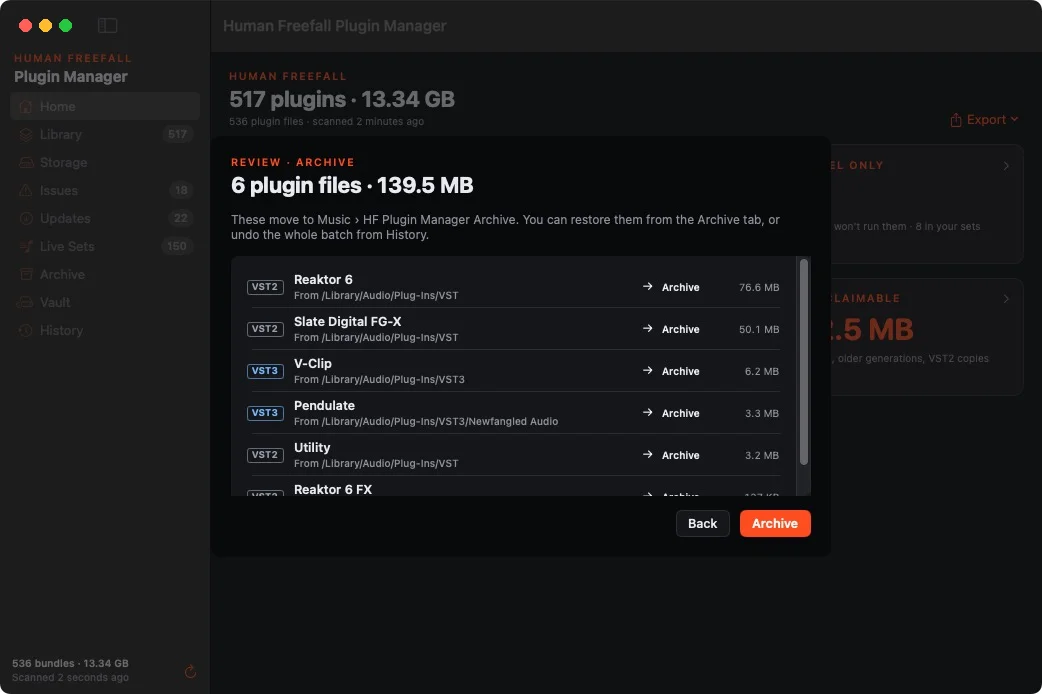
Every change shows what moves, from where to where, and whether macOS will ask for your password, once per batch at most.
Each batch leaves a receipt in History that you can undo.
The window stays live while macOS asks for your password, the app won't quit mid-move, and an interrupted batch is picked up on the next launch.
Version 1.0 Beta 5 supports Apple silicon and Intel Macs.
Plugins move to Music › Human Freefall Plugin Manager Archive. Move to Trash uses the real Trash, so Put Back works.
And the rest
The everyday tools, done properly.
Intel-only code, duplicate installs, older generations beside newer ones, VST2 copies of VST3 plugins, leftover 32-bit code, damaged bundles and Audio Units that fail Apple's check.
Space by format and by maker, the biggest plugins, your sample libraries, and what you could get back.
Your whole library as CSV or JSON, one row per plugin file with its tags and notes, safe to open in any spreadsheet.
A dated snapshot whenever something changes. Compare today with any date.
AU · VST3 · VST2 · AAX · CLAP
No account in the app. It only checks your license with the store and looks for updates. Your library and sets stay on your Mac.
Beta access
Get your plugin folder under control.
Perpetual lifetime license + all future updates. Use it on 2 Macs. One payment, no subscription.
Version 1.0 Beta 5 · macOS 14 or later · This is a beta, so back up before big clean-ups.